QFX5220-32CD-AFO: check access ports, uplinks and link rates.
This sketch helps describe your request. We will confirm protocols, port counts, coverage and failover when quoting.
03
YOUR QUOTE REQUEST
Tell us what you need
Add the quantity, options and installation details you want us to quote.
Include the hardware suffix, Junos release, airflow and power requirements. List software features and service coverage separately.
No license options are listed for this part number. If you need software, add its manufacturer part number and we will check it with the hardware.
04
SUPPORT & REPLACEMENT
Plan for support and future replacement
Check support dates, replacement options and whether continued use still makes sense.
Support dates
We do not have confirmed sales and support dates for this part number.
Send us the full QFX5220-32CD-AFO order code, software release and support details before planning long-term use.
Ask us to check the current sales and support status
Choosing a replacement
Products with similar names or connectors may still be incompatible. Compare the full specifications, installed system and software requirements.
Compare related products These products may be related, but we have not confirmed them as replacements.What should I compare?
Physical fit, connectors and power
Capacity and required performance
Software, firmware and feature support
Licensing, service coverage and data and configuration migration
USING HARDWARE RESPONSIBLY
Maintain, redeploy or replace
Consider repairability, remaining support and actual operating demand. Extending service life is useful only when the equipment still meets your security and reliability requirements.
MaintainCheck parts, firmware and service options.
RedeployMatch a suitable role and securely erase any retained data.
Retire responsiblyUse documented data removal and an appropriate electronics recycler.
Compare operating energy
Use measured average input power for the same workload. PSU ratings and processor TDP are different from total system power.
Energy difference = (current W − proposed W) × hours × units ÷ 1,000. Excludes cooling, embodied emissions and purchase costs.
CONNECTION DETAILS
Network connections and supported equipment
Check the protocol and port requirements of the equipment you intend to connect. Ethernet, Fibre Channel, InfiniBand and carrier interfaces are not interchangeable.
CONNECTS TOClients, servers or access links
→
QFX5220-32CD-AFONetwork Switch
→
USED FORConnected network equipment
What to check before installation
Port type, line rate, optics, reach and software license
Peer platform support, resiliency and management design
Browse the categories above for related equipment, then send us the full configuration so we can check the fit.
PRODUCT DETAILS
Features and applications
Juniper / product documentation
Hardware, software and transceiver compatibility
Use the model and hardware identifier to select the relevant release, interface and supported-media records. Keep licensing and physical accessories itemized.
WAREHOUSE AND INSTALLATION VIEWS
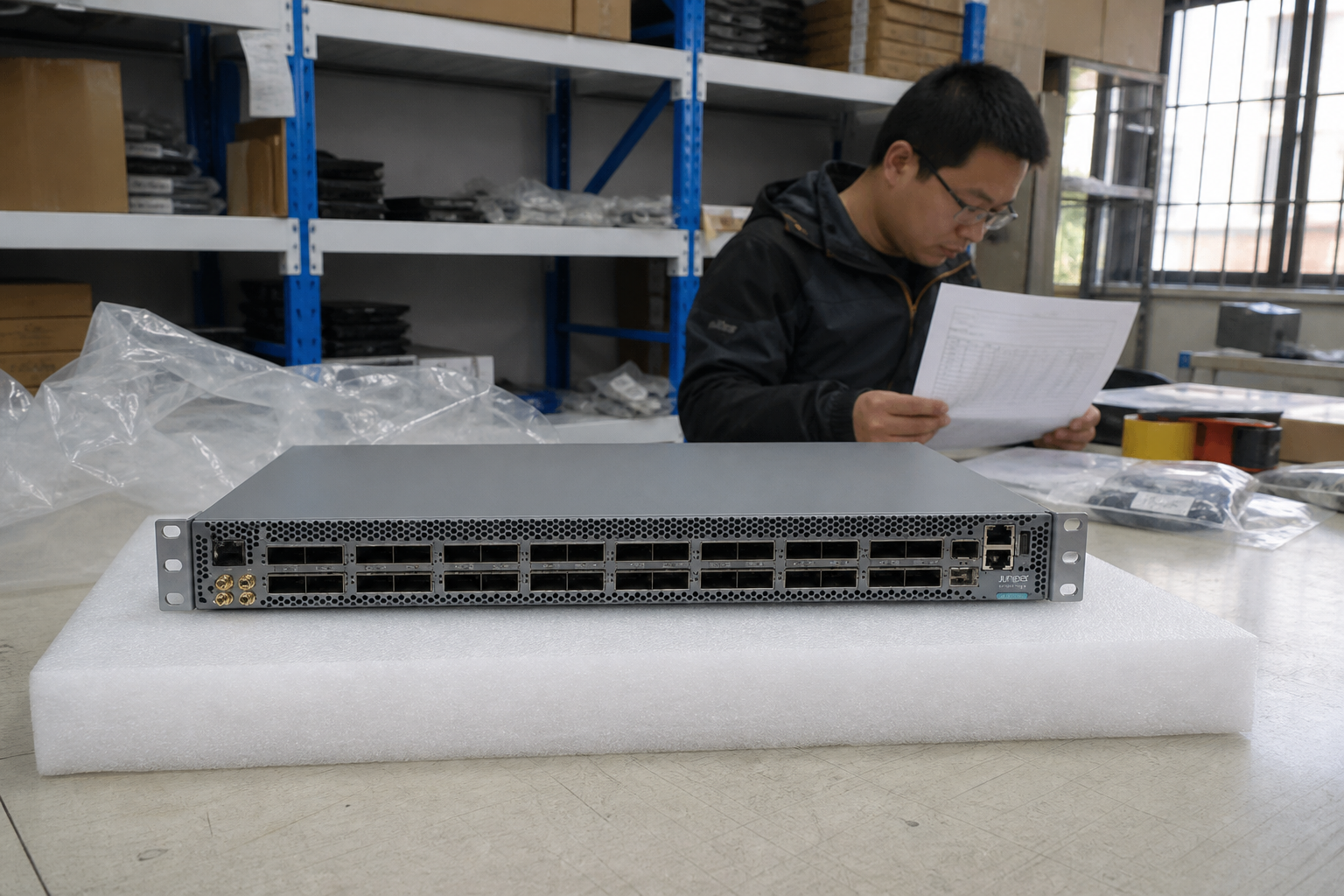
See Juniper Networks QFX5220-32CD in three deployment contexts
Typical installation scenes based on the model product reference. Confirm the chassis using manufacturer P/N QFX5220-32CD-AFO.
model referenceThe source page title and product identifier name QFX5220-32CD-AFO and display its complete chassis. The retained 2100x437 official rear reference preserves the exact fan and PSU geometry; the exact-PN front product image was also checked for port and faceplate geometry.Traceable sourceProduct image informationThe warehouse, bench and installation backgrounds are illustrative. Confirm the offered unit with current product photographs before dispatch.
Juniper hardware and software compatibility
Carry the complete manufacturer identifier into the configuration check and document the intended installation, software environment and included items.
Identify hardware
Retain the chassis, module or optic order code and any revision.
Choose the release
Locate the applicable hardware guide and software release documentation.
Check cables and transceivers
Match both endpoints using the manufacturer compatibility information.
Information to include in your request
Hardware reference
Model, slot or port, existing label
Software reference
Applicable Junos or other product software family and release
Media reference
Optic/cable code, peer device and reach requirement
Network-system planning
Selection and installation requirements
Decision
Information to provide
Impact on selection
Topology and role
Peer devices, connection map and required network role
Identifies the protocols and interoperability requirements to check.
Physical links
Port type, required link rate, connector and cable reach
Defines the optics or cabling review for both ends of each link.
Operating configuration
Airflow, power, software release, licenses and management needs
Resolves model suffixes, deployment fit and entitlement scope.
Software modelJuniper high-performance hardwareDeployment roleData-center switchingSales statusContact for availability
01 · Hardware overview
Hardware overview
Review physical interfaces, airflow, power, expansion and field-replaceable units before adding software and support.
Platform detailCanonical Juniper QFX5220-32CD network hardware model
Juniper physical platform and regional SKU are matched before order.
Interface profileAirflow, power, optics/DAC, software feature authorization and support options remain configurable on the detail page
Software rights are itemized separately from the hardware.
System capabilityExact port configuration, hardware revision and regional SKU are validated before order
Port, airflow, power and rack requirements are checked against the target topology.
Order structureHardware + license + support
Optics, cables and service terms remain visible as separate BOM lines.
Manufacturer P/NQFX5220-32CD-AFOProduct informationCurrent manufacturer catalog, reviewed in 2026Embedded software rightJunos OS Evolved standard software is embedded with the hardware. Advanced 1, Advanced 2, and Premium 1 QFX5000 Class 3 feature tiers are separate orderable rights and are not represented as included in QFX5220-32CD-AFO.
Platform-specific specifications
Data Ports32 x QSFP56-DD ports supporting up to 400GbE and breakout operationSwitching Capacity25.6 Tbps bidirectionalOperating SystemJunos OS EvolvedPower And AirflowTwo redundant hot-swappable AC power supplies; airflow-out (AFO) bundleForm Factor1U fixed-port switchDeployment RoleSpine, leaf, super-spine, and high-density 400GbE data-center interconnect
Orderable license P/Ns
P/N
Type
Tier
Term
Binding
SKU information
S-QFX5K-C3-A1-1QFX5000 Class 3 Advanced 1
Feature subscription
Advanced 1
12 months
device
S-QFX5K-C3-A1-3QFX5000 Class 3 Advanced 1
Feature subscription
Advanced 1
36 months
device
S-QFX5K-C3-A1-5QFX5000 Class 3 Advanced 1
Feature subscription
Advanced 1
60 months
device
S-QFX5K-C3-A1-PQFX5000 Class 3 Advanced 1
Feature subscription
Advanced 1
-
device
S-QFX5K-C3-A2-1QFX5000 Class 3 Advanced 2
Feature subscription
Advanced 2
12 months
device
S-QFX5K-C3-A2-3QFX5000 Class 3 Advanced 2
Feature subscription
Advanced 2
36 months
device
S-QFX5K-C3-A2-5QFX5000 Class 3 Advanced 2
Feature subscription
Advanced 2
60 months
device
S-QFX5K-C3-A2-PQFX5000 Class 3 Advanced 2
Feature subscription
Advanced 2
-
device
S-QFX5K-C3-P1-1QFX5000 Class 3 Premium 1
Feature subscription
Premium 1
12 months
device
S-QFX5K-C3-P1-3QFX5000 Class 3 Premium 1
Feature subscription
Premium 1
36 months
device
S-QFX5K-C3-P1-5QFX5000 Class 3 Premium 1
Feature subscription
Premium 1
60 months
device
S-QFX5K-C3-P1-PQFX5000 Class 3 Premium 1
Feature subscription
Premium 1
-
device
Manufacturer reference
Official manufacturer information · The official data sheet identifies the QFX5220-32CD 1U platform with 32 QSFP56-DD ports and Junos OS Evolved. It supports 25.6 Tbps bidirectional switching capacity, redundant hot-swappable power, and airflow options.
Official manufacturer information · The current manufacturer catalog lists hardware P/N QFX5220-32CD-AFO. The title and specifications identify a 32 x 400G, 1U, AC, airflow-out configuration with dual power supplies.
Official manufacturer information · The official table classifies QFX5220-32CD as a Class 3 QFX5000 platform. It publishes the Class 3 Advanced 1, Advanced 2, and Premium 1 subscription and perpetual order-number patterns used below.
Professional product reference · The professional exact-PN page names QFX5220-32CD-AFO and the 32-port QSFP-DD front layout. It also confirms airflow-out cooling, dual hot-swappable AC power supplies, and the complete 1U chassis configuration.
02 · License / support tiers
License and support tiers
Software rights, management subscriptions and support terms are quoted as separate tiers for this vendor and product family.
Base software rightStandard tier is included perpetually with supported hardware platforms; Advanced and Premium add features by product class.
Feature and management tierStandard / Advanced / Premium
Binding and deliveryLicense terms and transfer rules depend on the exact platform and SKU. Confirm the compatible Juniper software SKU before ordering Advanced or Premium features.
Support and renewalCustomer support is selected with the hardware; some subscription offerings include embedded support as defined by Juniper.
Software rightsStandard
Base feature set · perpetual · included on supported hardware
Price on requestSoftware rightsAdvanced
Superset of Standard · subscription or perpetual where the family SKU table permits · optional
Price on requestSupport serviceExact license SKU review
Customer support is selected with the hardware; some subscription offerings include embedded support as defined by Juniper.
Price on request
07 · Integration checks
Compatibility checks for this product
Confirm protocol and feature support against the model documentation and your proposed network topology.
Port and link design
Match documented port modes and supported media to the server, storage or switch at the other end of each link.
Fabric functions
Verify every required routing, overlay, aggregation or automation function for the exact hardware, software release and entitlement.
Operations boundaries
Confirm supported peer combinations and management integrations; proprietary peer state must follow the manufacturer support matrix.
Acceptance
Validate the agreed topology, throughput workload, monitoring and recovery procedures before production use.
Product specifications
Manufacturer
Juniper
Product family
Juniper Network Switch
Product series
QFX5220-32CD
Manufacturer P/N
QFX5220-32CD-AFO
Product reference
Manufacturer P/N QFX5220-32CD-AFO, confirmed using the cited OEM documentation and professional product references.
Product image
Context images based on the cited model reference for QFX5220-32CD-AFO; the surrounding setting is illustrative; confirm the supplied product using the manufacturer P/N and current product photos.
Compatibility and BOM checks
Check before ordering
Keep chassis, line cards, interface modules and ASICs as separate product classes.
Confirm port modes, media, routing or serial requirements for the model.
Match software release, licenses, management and support where applicable.
Review power, environment, mounting and redundancy for the documented device configuration.
Inventory and dispatchContact us to confirm stock, preparation time and dispatch date for the part number and configuration you need.Condition and warrantyCondition grade, warranty term, exclusions and RMA route are written into the quotation and invoice.VAT, tax and dutiesProduct price, freight, sales tax, VAT, customs duty and importer responsibility remain separate and visible.Purchase order and paymentA purchase order is reviewed against the accepted quotation; payment schedule and any credit terms require written confirmation.