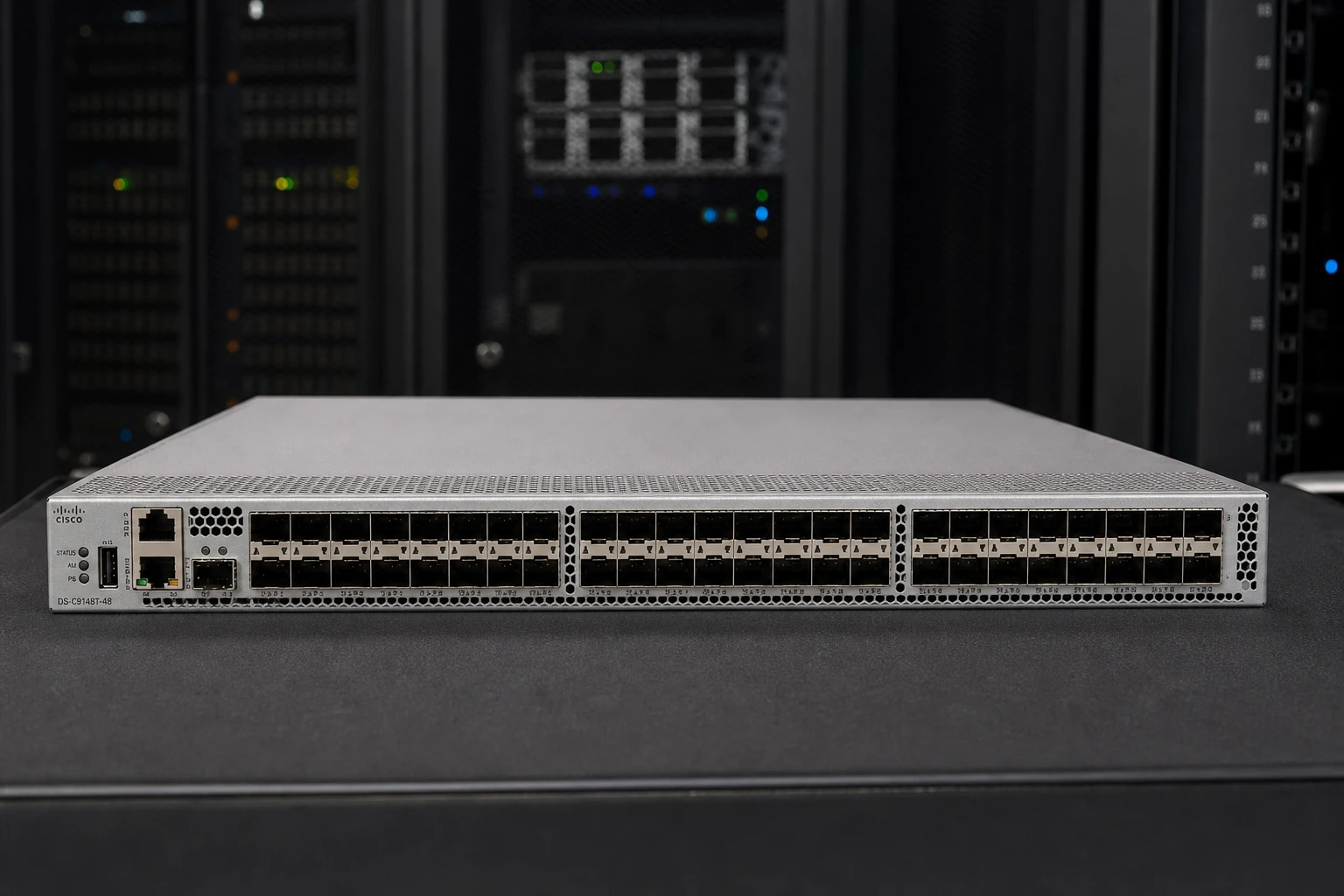
DS-C9148T-24EK9: check access ports, uplinks and link rates.
This sketch helps describe your request. We will confirm protocols, port counts, coverage and failover when quoting.
03
YOUR QUOTE REQUEST
Tell us what you need
Add the quantity, options and installation details you want us to quote.
Specify the exact Cisco PID, software release and any required feature or throughput entitlement. Hardware and licenses are separate unless the quoted bundle states otherwise.
No license options are listed for this part number. If you need software, add its manufacturer part number and we will check it with the hardware.
04
SUPPORT & REPLACEMENT
Plan for support and future replacement
Check support dates, replacement options and whether continued use still makes sense.
Support dates
We do not have confirmed sales and support dates for this part number.
Send us the full DS-C9148T-24EK9 order code, software release and support details before planning long-term use.
Ask us to check the current sales and support status
Choosing a replacement
Products with similar names or connectors may still be incompatible. Compare the full specifications, installed system and software requirements.
Compare related products These products may be related, but we have not confirmed them as replacements.What should I compare?
Physical fit, connectors and power
Capacity and required performance
Software, firmware and feature support
Licensing, service coverage and data and configuration migration
USING HARDWARE RESPONSIBLY
Maintain, redeploy or replace
Consider repairability, remaining support and actual operating demand. Extending service life is useful only when the equipment still meets your security and reliability requirements.
MaintainCheck parts, firmware and service options.
RedeployMatch a suitable role and securely erase any retained data.
Retire responsiblyUse documented data removal and an appropriate electronics recycler.
Compare operating energy
Use measured average input power for the same workload. PSU ratings and processor TDP are different from total system power.
Energy difference = (current W − proposed W) × hours × units ÷ 1,000. Excludes cooling, embodied emissions and purchase costs.
STORAGE & SAN
Storage systems and SAN solutions
Compare storage arrays, servers and switches for Fibre Channel, iSCSI and file storage. Select a system below to see its connections and ordering considerations.
Connection example · confirm compatibility before ordering
SHOW CONNECTIONS
Select a product to see how it connects ↙
Swipe to explore the full hardware map →
01 SERVERS
02 NETWORK
03 STORAGE
DUAL-CONTROLLER STORAGENetApp AFF A250
Logical data paths. Images show the equipment; cable endpoints are not physical port locations.
RELATED PARTS & SUPPORT
Adapters, transceivers and cables
01
Array host interface
AFF A250 32Gb FC option; verify the installed adapter and port mode.
02
FC switch ports
MDS 9148T licensed ports, compatible FC optics and NX-OS.
03
Host access
Qualified FC HBA, ONTAP host utilities where applicable, and MPIO.
04
Data protection
Review ONTAP entitlements, snapshots and replication requirements.
01
Give each host a qualified FC path into both fabrics.
02
Zone initiators to the intended storage targets.
03
Map volumes and verify recovery through host multipathing.
Use the AFF A250 FC interface option for shared LUNs over two MDS fabrics. The 25GbE NFS example uses a different host connection; changing a protocol label alone does not convert the hardware.
Confirm the full configuration and compatibility before ordering.
NetApp · Fibre Channel: equipment and connection requirements+
Use the AFF A250 FC interface option for shared LUNs over two MDS fabrics. The 25GbE NFS example uses a different host connection; changing a protocol label alone does not convert the hardware.
Check the specific HBA, switch software, ONTAP release, optics and host OS together; this proposed combination is not presented as a FlexPod certified design.
Use supported zoning, igroups, LUN mapping and ALUA multipathing. NVMe/FC is a separate host/protocol qualification from the FCP example shown.
Keep fabrics A and B isolated. Use supported initiator/target zoning, LUN masking and host multipathing. Do not connect them with an Ethernet-style peer link.
Two HBA ports provide path diversity, but one dual-port adapter remains a shared failure point. Use separately qualified adapters when adapter-level redundancy is required.
Connection example · confirm compatibility before ordering
Dell · Fibre Channel: equipment and connection requirements+
Connect PowerEdge hosts to a dual-controller ME5024 through two MDS 9148T fabrics. Select the 32Gb FC controller configuration; the iSCSI model uses Ethernet hardware instead.
Check the MDS 9148T, support terms, switch software, HBA, driver and array firmware as one complete design.
ME5 lists Emulex LPe35002 and QLogic QLE2772 among its FC HBA options. An array-side listing alone does not confirm PowerEdge R750 or operating-system support.
Keep fabrics A and B isolated. Use supported initiator/target zoning, LUN masking and host multipathing. Do not connect them with an Ethernet-style peer link.
Two HBA ports provide path diversity, but one dual-port adapter remains a shared failure point. Use separately qualified adapters when adapter-level redundancy is required.
Connection example · confirm compatibility before ordering
PRODUCT DETAILS
Features and applications
Cisco order-line boundaries
Order line
Evidence to request
Keep explicit
Hardware PID
Full product identifier and revision
Chassis or component; quantity and physical variant
Operating software
Product family, release and intended features
Compatibility with the named hardware
Entitlement
License or service SKU and requested term
Account association and activation scope
Network-system planning
Selection and installation requirements
Decision
Information to provide
Impact on selection
Topology and role
Peer devices, connection map and required network role
Identifies the protocols and interoperability requirements to check.
Physical links
Port type, required link rate, connector and cable reach
Defines the optics or cabling review for both ends of each link.
Operating configuration
Airflow, power, software release, licenses and management needs
Resolves model suffixes, deployment fit and entitlement scope.
Software modelModel-specific entitlement reviewDeployment roleStorage-area networkingSales statusContact for availability
Manufacturer P/NDS-C9148T-24EK9Product informationCurrent manufacturer catalog, reviewed in 2026Embedded software rightMDS NX-OS base operation; feature and port entitlements are separate where listed
Platform-specific specifications
Form Factor1RU fixed 48-port Fibre Channel switchFc Ports48 x SFP+; 24 active in base configurationPort Speed4/8/16/32 Gbps Fibre Channel autosensingGrowth8-port activation increments to 48 active portsSwitching Capacity1536 Gbps aggregate full duplexPower And Airflowtwo 650W AC PSU bays and four fan modules; matched port-side exhaust or intake configurationsOrdering detailsAirflow is part of the chassis PID. The model name alone is insufficient for a BOM or exact-PN image claim.
M9148T-PL8Cisco documented MDS port or feature entitlement
Feature subscription
Platform entitlement
-
device
M9148T-PL8-SL=Cisco documented MDS port or feature entitlement
Feature subscription
Platform entitlement
-
device
M91XK9-A-1YCisco documented MDS port or feature entitlement
Feature subscription
Advanced
12 months
device
M91XK9-A-3YCisco documented MDS port or feature entitlement
Feature subscription
Advanced
36 months
device
M91XK9-A-5YCisco documented MDS port or feature entitlement
Feature subscription
Advanced
60 months
device
M91XK9-A-7YCisco documented MDS port or feature entitlement
Feature subscription
Advanced
84 months
device
M91XK9-P-1YCisco documented MDS port or feature entitlement
Feature subscription
Platform entitlement
12 months
device
M91XK9-P-3YCisco documented MDS port or feature entitlement
Feature subscription
Platform entitlement
36 months
device
M91XK9-P-5YCisco documented MDS port or feature entitlement
Feature subscription
Platform entitlement
60 months
device
M91XK9-P-7YCisco documented MDS port or feature entitlement
Feature subscription
Platform entitlement
84 months
device
Manufacturer reference
Manufacturer part number and specifications
Official manufacturer information · supporting product information
Official manufacturer information · supporting product information
Professional product reference · exact PID DS-C9148T-24EK9
02 · Software and support
Software and support checks
Use the software and support requirements for Cisco MDS 9148T. Requirements from other product families do not confirm entitlement for this model.
Software dependencyConfirm the supported releaseEntitlement scopeQuote applicable rights only
Software, subscriptions and support are included only when identified by exact orderable SKU in the quotation.
Renewal and transferVerify the supplied entitlement
Confirm ownership, transfer eligibility, term and regional support availability for the offered condition.
approval documentsKeep the compatibility record
Attach the agreed model, release and compatibility evidence to the final deployment BOM.
04 · Deployment applications
Deployment applications
Planning scenarios for storage-area networking; confirm exact platform support before selecting a configuration.
01Host-to-storage fabric
Plan supported Fibre Channel paths between host bus adapters and storage arrays.
02SAN expansion
Check supported fabric membership and available ports before adding the switch.
03Resilient storage paths
Map independent storage paths and validate the documented redundancy design.
04Storage operations
Prepare zoning, fabric monitoring and recovery procedures for the target SAN.
06 · Deployment package
Recommended deployment package
Select the model and compatible dependencies together. The checklist is a planning aid; the quotation identifies the supplied items.
Equipment and accessories for installation
Build the order around the actual storage-area networking role.
model: Cisco MDS 9148T
Check the switch, host bus adapters, storage array and firmware against the supported storage interoperability matrix.
Confirm the supported Fibre Channel link modes, zoning, fabric membership and any separately licensed functions for the model.
State condition, quantity, region and support requirements in the quotation.
Installation and acceptance requirements
Include the dependencies that the manufacturer supports for this configuration.
Specify supported optical modules, fiber type, connectors and distance for each storage link.
Validate host-to-array paths, zoning, redundancy and recovery using the approved SAN design.
Itemize only compatible components and applicable software rights.
Record the approved configuration and acceptance criteria.
07 · Integration checks
Compatibility checks for this product
Confirm protocol and feature support against the model documentation and your proposed network topology.
Storage interoperability
Check the switch, host bus adapters, storage array and firmware against the supported storage interoperability matrix.
Fabric design
Confirm the supported Fibre Channel link modes, zoning, fabric membership and any separately licensed functions for the model.
Link components
Specify supported optical modules, fiber type, connectors and distance for each storage link.
Acceptance
Validate host-to-array paths, zoning, redundancy and recovery using the approved SAN design.
Model documentation
Model-specific software and support
Cisco MDS 9148T
Product roleStorage-area networking
Confirm the model and supported deployment environment.
Software and entitlementVerify the exact SKUService coverageWritten quotation required
Confirm support scope, region, condition and entitlement transfer before ordering.
Product specifications
Manufacturer
Cisco
Product family
Cisco SAN Switch
Product series
MDS 9148T
Manufacturer P/N
DS-C9148T-24EK9
Product reference
Manufacturer P/N DS-C9148T-24EK9, confirmed using the cited OEM documentation and professional product references.
Product image
Illustrative scene. Request photos of the offered unit before ordering.
Compatibility and BOM checks
Check before ordering
Keep chassis, line cards, interface modules and ASICs as separate product classes.
Confirm port modes, media, routing or serial requirements for the model.
Match software release, licenses, management and support where applicable.
Review power, environment, mounting and redundancy for the documented device configuration.
Inventory and dispatchContact us to confirm stock, preparation time and dispatch date for the part number and configuration you need.Condition and warrantyCondition grade, warranty term, exclusions and RMA route are written into the quotation and invoice.VAT, tax and dutiesProduct price, freight, sales tax, VAT, customs duty and importer responsibility remain separate and visible.Purchase order and paymentA purchase order is reviewed against the accepted quotation; payment schedule and any credit terms require written confirmation.